Reviews
Who can rate an appointment, how you choose which reviews count toward your public average rating, and where ratings are shown to clients and to you.

Reviews are ratings from one to five stars, with an optional comment, that clients leave after a completed appointment. Only clients with an account can leave a rating, and only for their own appointment that you've marked as completed, so a random visitor to your page can't leave one. You choose which ratings count toward the public average on your page. Here you'll learn how a client leaves a rating, how you publish and hide reviews, and where ratings are shown.
Before you start
- The Reviews page appears in the menu for users with the Owner and Manager roles, and only they can publish reviews.
- Clients leave ratings in the Appointa app. Rating isn't possible on the public website.
- Only an appointment with the status Completed can be rated. You mark an appointment as completed with the Complete button in the appointment details.
How a client leaves a rating
- In the Appointa app, the client opens the Appointments tab, then Past.
- They open the completed appointment and tap Rate this appointment.
- On the How did it go? screen, they choose from one to five stars.
- Optionally, they write a comment in the Comment (optional) field, up to 2000 characters.
- They tap Submit review.
| Rule | Explanation |
|---|---|
| Completed appointments only | The appointment must have the status Completed. An appointment that is pending, confirmed, cancelled or marked as a no-show can't be rated. |
| One rating per appointment | The same appointment can't be rated twice. After submitting, the Rate this appointment button disappears. |
| Own appointments only | A client rates only appointments at your business that are linked to their account, whether they booked them themselves or your team added them. |
| Rating and comment | The rating from 1 to 5 is required, the comment isn't. |
Review list
In the sidebar, choose Reviews. Reviews are sorted newest first, 10 per page, with page numbers below the table.
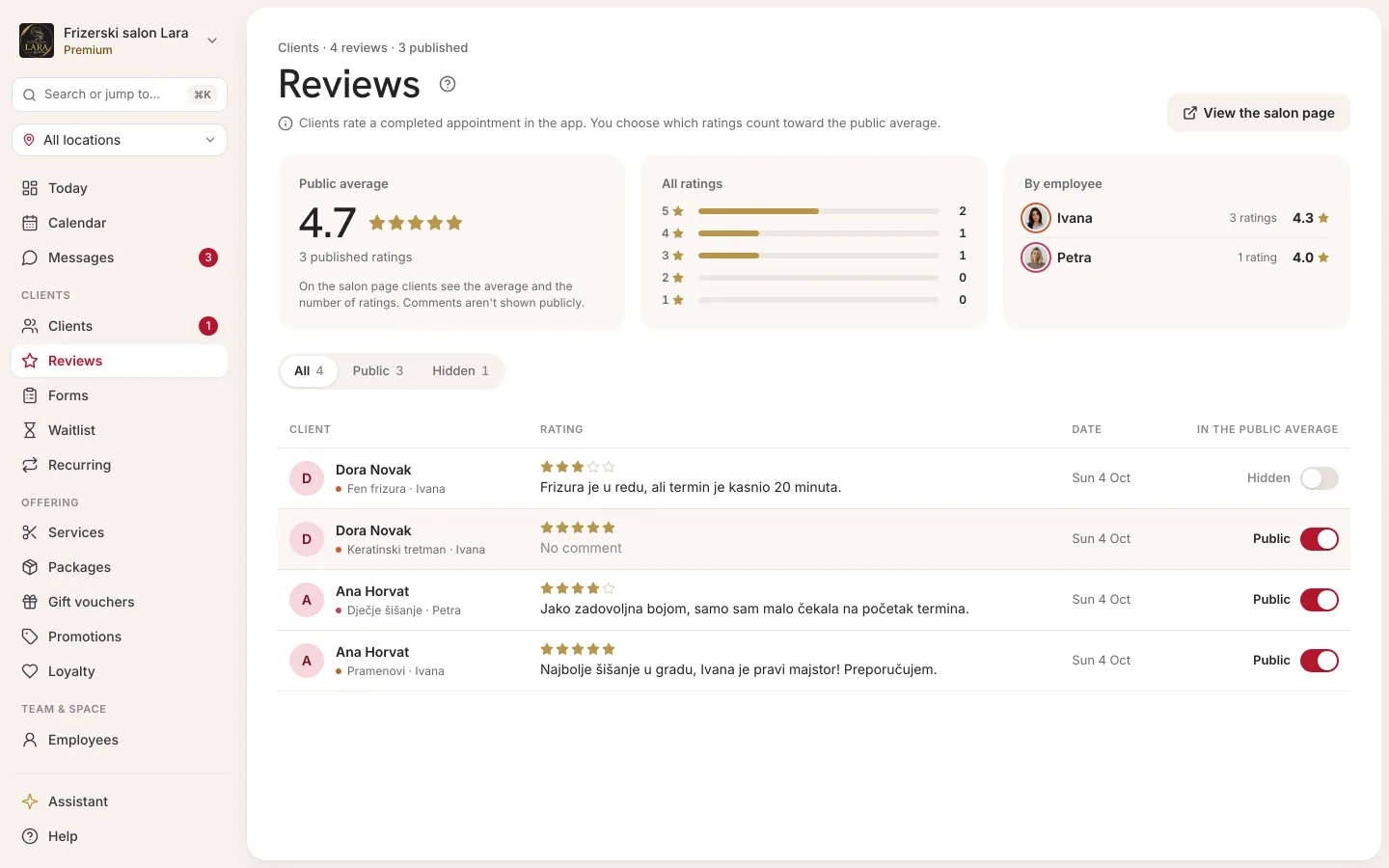
| Column | What it shows |
|---|---|
| Client | The client's name, and below it the service and staff member of the rated appointment. If the client deleted their account or their data was anonymised, it says Former user. |
| Rating | From one to five stars. |
| Comment | The first two lines of the comment, or a dash if there isn't one. |
| Date | When the rating was left. |
| Public | The switch you use to publish or hide the review. |
On a phone, each review is shown as a card with the same details and the switch.
Publishing and hiding
Every new review arrives unpublished: you can see it, but it doesn't count toward the public average.
- Open Reviews.
- Turn on the Public switch next to the review you want to publish.
- The change is saved immediately, with no save button.
To hide a published review, turn the same switch off. You can publish a review and hide it again whenever you like. If the change fails, the message Something went wrong. Please try again. appears above the table and the switch stays as it was.
Public average rating
Your public page shows only the average and the number of published reviews, never individual comments or client names. The average sits in the header, next to the address: a star, the average with one decimal place and the number of ratings, e.g. “4.8 · 12 reviews”.
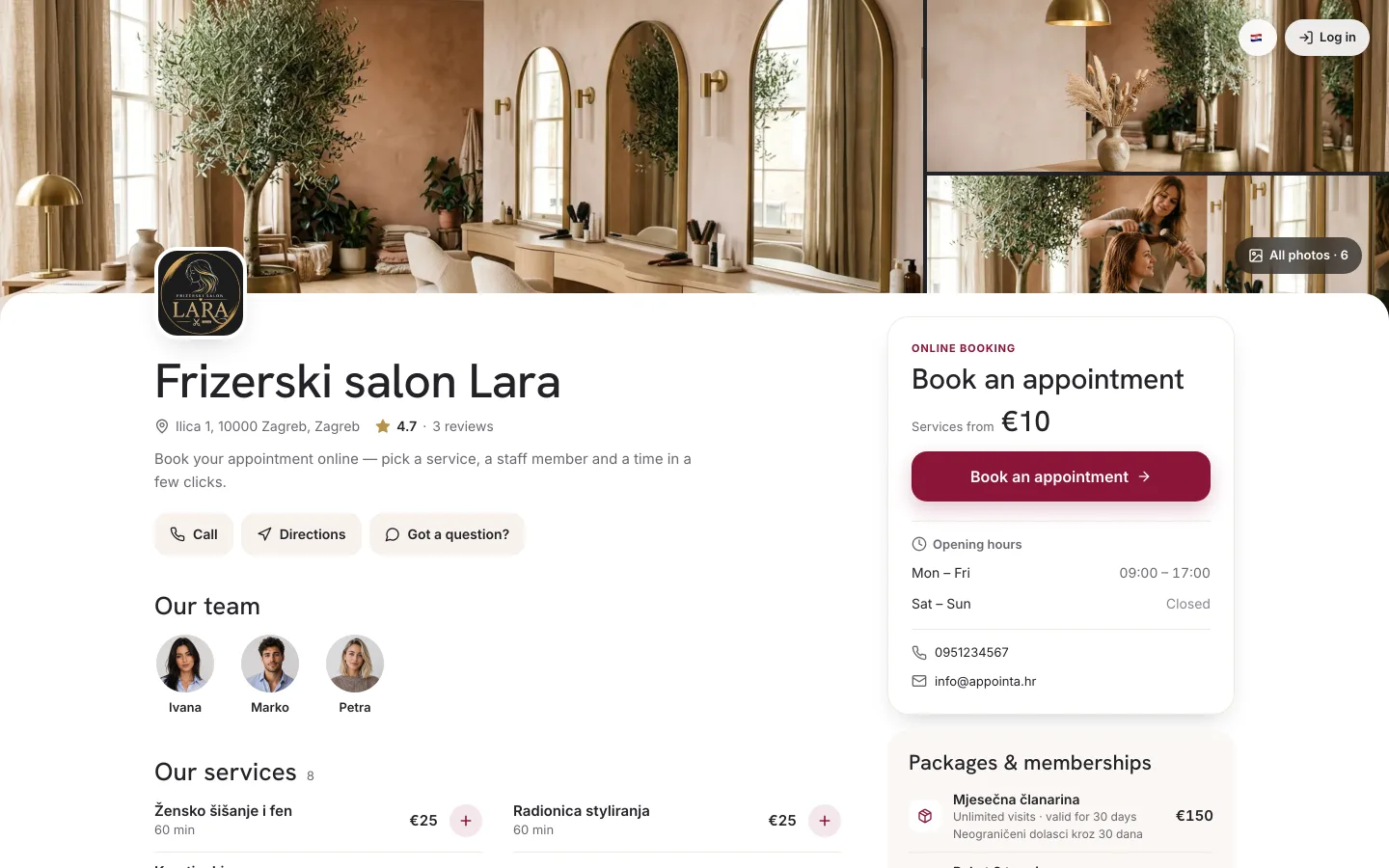
- Until there is at least one published review, the average isn't shown.
- When you publish or hide a review, the average changes the next time the page is opened.
- The page also passes the average and number of ratings to search engines like Google, in its business information. This isn't done for the demo business.
Where else you see ratings
| Place | What you see |
|---|---|
| Client card | The Reviews left by the client section: the rating, service and staff member, date, comment and a public or private label. |
| Analytics | In the Staff performance table, the Avg rating column for the selected period. |
| Staff dashboard | A staff member, and an owner who also works with clients, sees their own average rating and the latest ratings for their appointments. |
In analytics and on the staff dashboard, all ratings count, published and unpublished, because they're used for tracking quality internally. Publishing only affects the public average.
Frequently asked questions
Why don't I have any reviews?
Only clients who use the Appointa app can leave a rating, and only for appointments marked as Completed. Check that you mark appointments with the Complete button, and recommend the app to your clients.
Can a client rate an appointment through the website?
No. On the public page, My appointments only shows upcoming appointments, and rating is done in the Appointa app.
Can I delete an unpleasant review?
No. You can leave the review unpublished, so it doesn't affect the public average and nobody but you sees it.
Do staff see reviews?
Staff don't have the Reviews page, but they see the ratings for their own appointments on their dashboard.
Do clients see other clients' comments?
No. Only the average and the number of published ratings are shown publicly.