My account
Your user account: name and email, language and theme, several businesses on one account, and deleting your account and what happens to your data.
Your user account is what you use to sign in to Appointa: your email, your password or Google/Apple sign-in, and two-factor sign-in. A business is something else: it has its own name, services, clients and subscription. On this page you'll learn what belongs to your account, where its settings are, how several businesses on one account work and what happens when you delete your account.
Account and business
| User account | Business | |
|---|---|---|
| Whose it is | Yours, personal | The owner's, shared by the whole team |
| What it contains | Name, email, password, two-factor sign-in, language | Name, public page, services, employees, clients, appointments, subscription |
| Where you edit it | The account menu, the Security tab, the Appointa Pro and Appointa mobile apps | Settings and the rest of the admin area |
Team members are connected to a business through their own accounts and a role: Owner, Manager or Staff. The roles are described on the Invitations and roles page.
Account menu
You open the account menu by clicking the card at the top of the sidebar (logo, name and plan). On a phone, first open the sidebar with the three-line button in the header. The whole interface is described on the Finding your way around the app page.
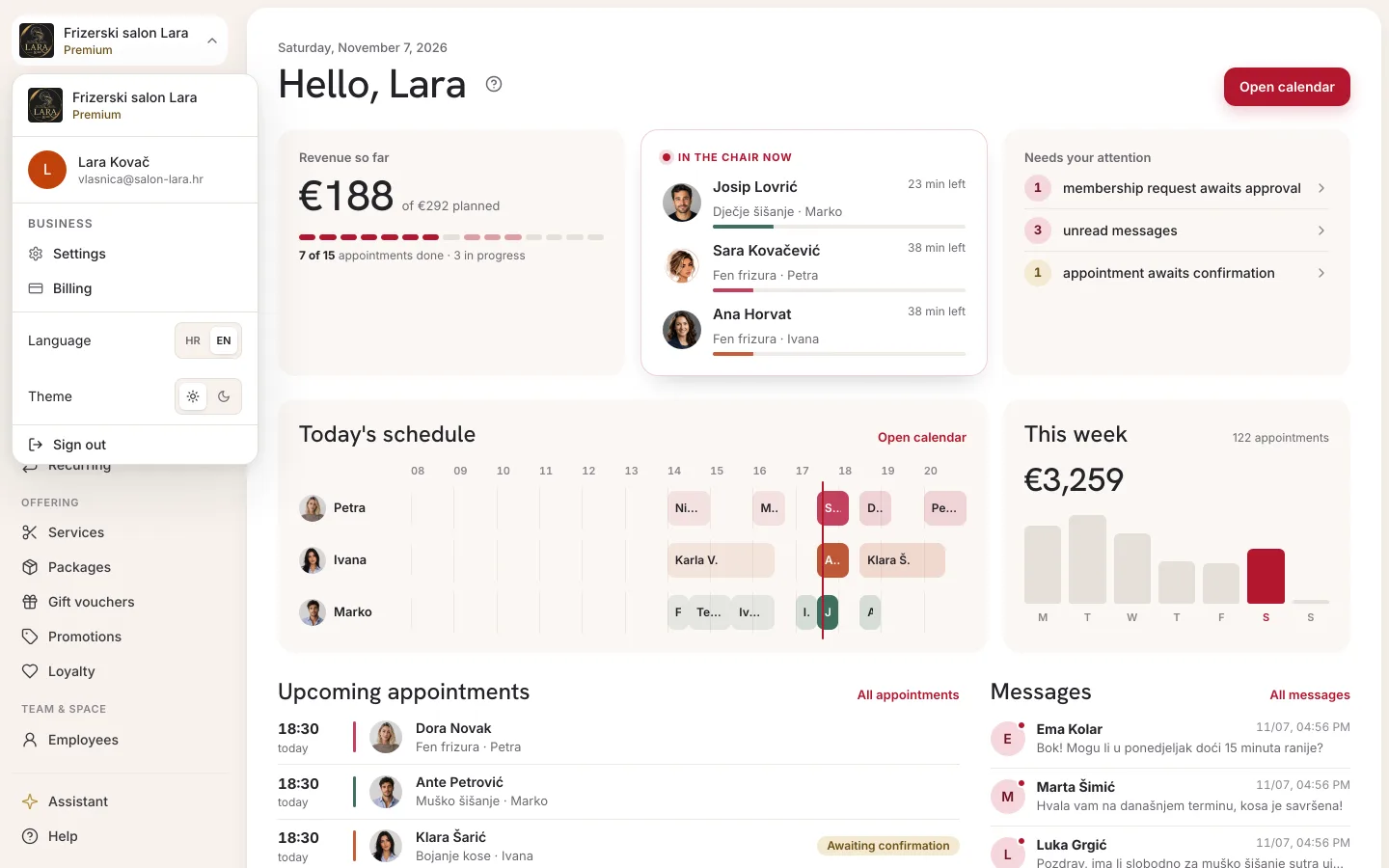
| Item | What it does | Who sees it |
|---|---|---|
| Business at the top | Shows which business you are currently working in | Everyone |
| Name and email | Show who is signed in | Everyone |
| Settings | Opens Business settings | Owner and manager |
| Billing | Subscription, plans and SMS credits, see Subscription and payment | Owner (not shown in a demo business) |
| Support | Questions to Appointa support, see Support | Owner and manager |
| Language | Switches the interface between Croatian (HR) and English (EN) | Everyone |
| Theme | Light theme (sun icon) or dark theme (moon icon) | Everyone |
| Sign out | Signs you out in this browser | Everyone |
Name and email
- Name is what you entered in the Full name field when you signed up, or the name that came from your Google or Apple account. If no name was entered, the menu shows your email instead.
- Email is your Appointa sign-in. It's where password links, two-factor sign-in codes and the account deletion confirmation are sent.
You can't edit your account name and email in the web admin area. The name your team and clients see in the calendar and when booking is the employee's name, and you change it in Employees. If you need to change the email you sign in with, contact support.
How you sign in, change your password and turn on two-factor sign-in is described on the Signing up and signing in and Security and two-factor sign-in pages.
Language and theme
- Language: in the account menu, click HR or EN. The interface switches to that language straight away, and page addresses in English get
/en/. - Theme: click the sun for the light theme or the moon for the dark theme. Your choice is remembered in that browser.
The HR | EN switch changes only the interface in that browser and isn't saved with your account. The mobile apps are in Croatian only for now. Messages Appointa sends to you personally, for example the email confirming account deletion, arrive in the language saved with your account; the default is Croatian. Some notifications about events in the business arrive in Croatian regardless.
Several businesses on one account
One account can be connected to several businesses, for example:
- you have your own business and, alongside it, a demo business for trying things out
- you are the owner of one business and work as staff in another
- you use the same account to book appointments as a client at other businesses, in the Appointa app or on their public pages
The admin area shows one business at a time: the one at the top of the sidebar. Everything you see and change (calendar, clients, settings) applies to that business. Your role can be different in each business.
Leaving a business
- As a team member: for now the app has no button for a member to leave a business on their own. The owner removes your access with the Remove access button on your employee card. The owner or a manager can revoke an invitation that hasn't been accepted yet. See Changing a role and removing access.
- As a client of another business: in the Appointa app, on the home screen, swipe the place's card to the left and tap Leave, then confirm in the Leave this place? dialog. The place disappears from your home screen, and your appointment history stays with the business. When you book there again, the place comes back to your list. See Home screen.
- Closing your own business: deleting your account doesn't close your business, and the app has no button for deleting a business. If you want to close it and remove its data, first cancel your subscription in Billing (Cancelling your subscription), then contact support.
Deleting your account
You start deleting your account in a mobile app and confirm it with a link from an email:
- in the Appointa Pro app: the More tab → Delete account
- in the Appointa app (for clients): Profile → Delete account
- Tap Delete account and read the warning: “Deleting your account is permanent. Your personal data will be removed and your appointment history anonymised. This cannot be undone.”
- Tap Send deletion request. Check your email appears.
- Open the email “Confirm your Appointa account deletion” and click Confirm deletion. The link is valid for 1 hour.
- The Delete your Appointa account page opens in your browser. Click Delete account.
- When Your account has been deleted appears, the deletion is complete and you are signed out on all devices.
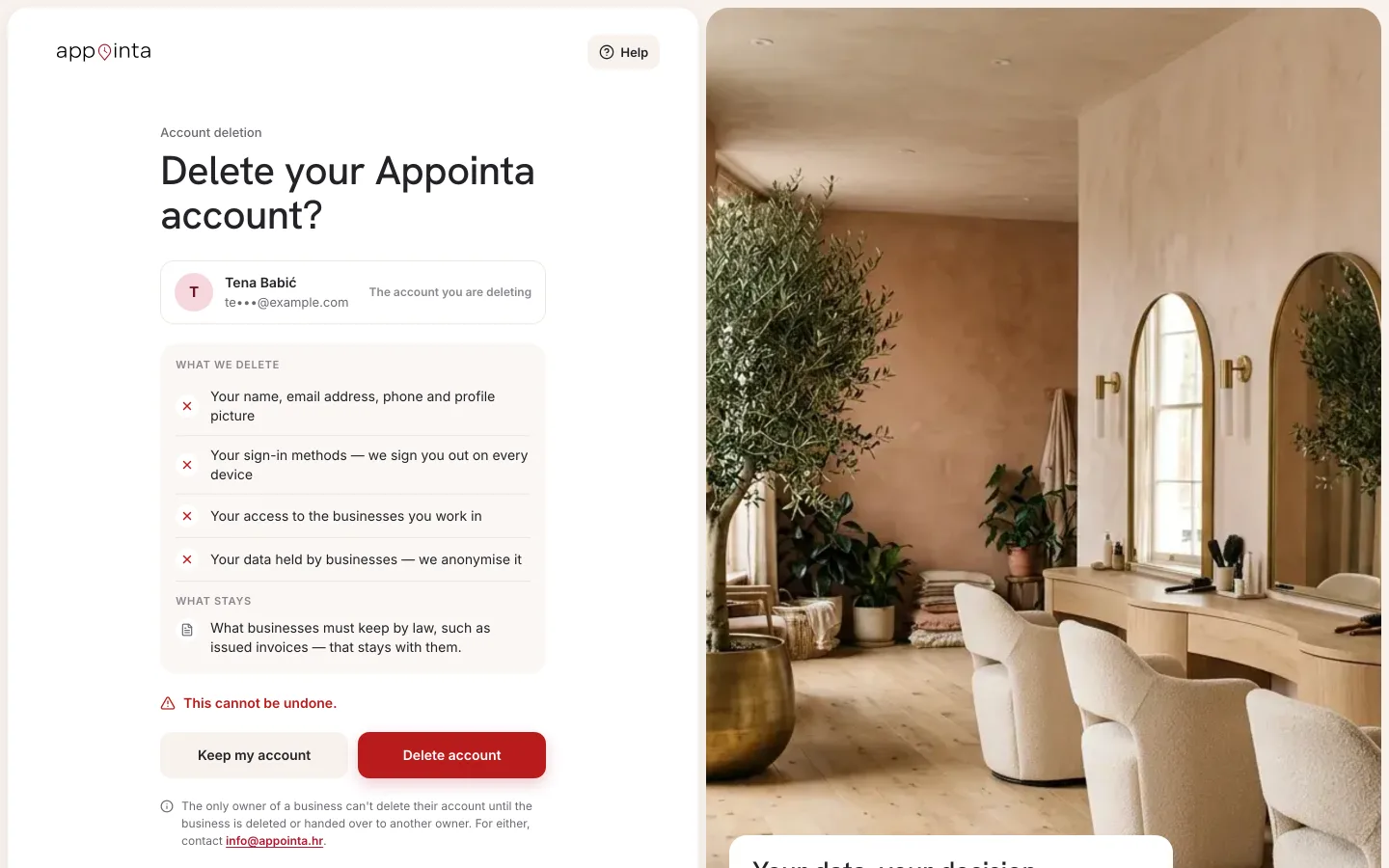
The link in the email doesn't delete anything by itself. The deletion happens only when you click the button on the page. If you request deletion again, only the newest link is valid. An expired or already used link says: “This link has expired or has already been used. Request deletion again from the app.”
If you own a business
While you are the only owner of an active business (or the person the business was opened by), you can't delete your account: the business would be left without an owner. The confirmation page then says “You can't delete your account while you own the business: …” and deletes nothing. First delete the business or hand it over to another owner — for either, contact support — then request deletion again from the app. Before closing the business, cancel the subscription in Billing (Cancelling your subscription).
A demo business, or a business you haven't finished setting up, doesn't stop the deletion.
What happens to your data
| Data | What happens |
|---|---|
| Your account name, phone number and profile picture | Deleted |
| Your account email address | Removed from the account. The address is no longer tied to Appointa: if you sign up with it again, you get a new, empty account. |
| Sign-in methods (password, Google, Apple) and two-step verification | Deleted, so nobody can sign in to the deleted account any more |
| Access to the businesses you work in | Ended. Your staff profile and its appointments stay with the business, without a link to your account. |
| Your client records at businesses | Anonymised: the name becomes “Anonymous client” (in each business's own language, for example “Anonimni klijent” at a Croatian business), and the email, phone number, picture, notes, date of birth and client card (allergies, preferences, styling notes, preferred staff member) are deleted |
| Your answers to forms | Permanently deleted |
| Appointment history | Stays with the business, without your personal data |
| Messages you sent | Stay in the conversation with the business, but are no longer linked to your account |
| Invoices businesses issued to you | Stay with the business (a legal retention requirement), without a link to your account |
| Accepted terms and consents | Stay on record as proof, without a link to your account |
| Push notifications and notification settings | Deleted |
| Sign-ins on devices | You are signed out everywhere |
FAQ
Can I delete my account on the web?
You start the deletion in the Appointa Pro or Appointa app, and on the web you only confirm it. If you don't use either app, write to [email protected] from the address the account was opened with or, as an owner or manager, send a request through Support (see Support).
Will my business disappear if I delete my account?
No. While you are the only owner of an active business, you can't delete your account at all (see If you own a business). If the business has another owner, it stays with its clients, appointments and subscription. To close the business, see Leaving a business.
I requested deletion, but I've changed my mind.
Simply don't confirm: don't click Delete account on the confirmation page. The link expires after an hour and your account stays untouched.
Why is my name in the menu different from my name in the calendar?
The menu shows your user account name, and the calendar shows the employee name entered in Employees. These are two separate pieces of information.
Does Language in the menu also change the language of emails?
No. The HR | EN switch changes only the interface language in the browser. Messages to you personally arrive in the language saved with your account (the default is Croatian), and the email for a new password arrives in the language of the page you requested it from.