Client privacy
How to anonymize a client's data at their request, what is deleted and what is kept, and what happens when a client deletes their account or leaves.
As a business, you keep your clients' personal data: contact details, visit history and sometimes health information from the chart or intake forms. On this page you'll find out what data Appointa keeps and who can see it, how to anonymize a client's data at their request, what happens when a client deletes their own account or leaves your business, and how clients turn off promotional notifications.
Before you start
- Only the Owner or a Manager can anonymize a client.
- Anonymization is irreversible. Do it only when the client asks for their data to be deleted or when you no longer have the right to keep it.
What client data you keep
| Data | Where it's shown | Who sees it |
|---|---|---|
| Name, email, phone, date of birth | Client list and client profile (date of birth in the Edit client panel) | The whole team |
| Chart (allergies, preferences, additional notes, preferred staff) | Client profile; allergies, preferences and additional notes also in the appointment details in the web calendar | The whole team. Not the client. |
| Notes | Client profile | The whole team. Not the client. |
| Appointment history | Calendar and client profile | The whole team |
| Notes the client wrote when booking | Appointment details | The whole team |
| Intake form answers and accepted consents | Appointment details in the calendar | The whole team, on the Pro and Premium plans. Every time the answers are opened, it's recorded. |
| Conversations | Messages | The whole team |
“The whole team” means all roles: Owner, Manager and Staff. Profiles are described on the Client profile page, and intake forms on the Intake forms and consents page.
Anonymizing a client
When a client asks you to delete their data (the right to erasure under the GDPR), anonymize them. Anonymization removes the name, contact details and the other data listed in the table below, and keeps the appointment history without the client's name.
- In the client list, open the client's profile.
- In the profile header, click ⋯ (three dots) and choose Anonymize client.
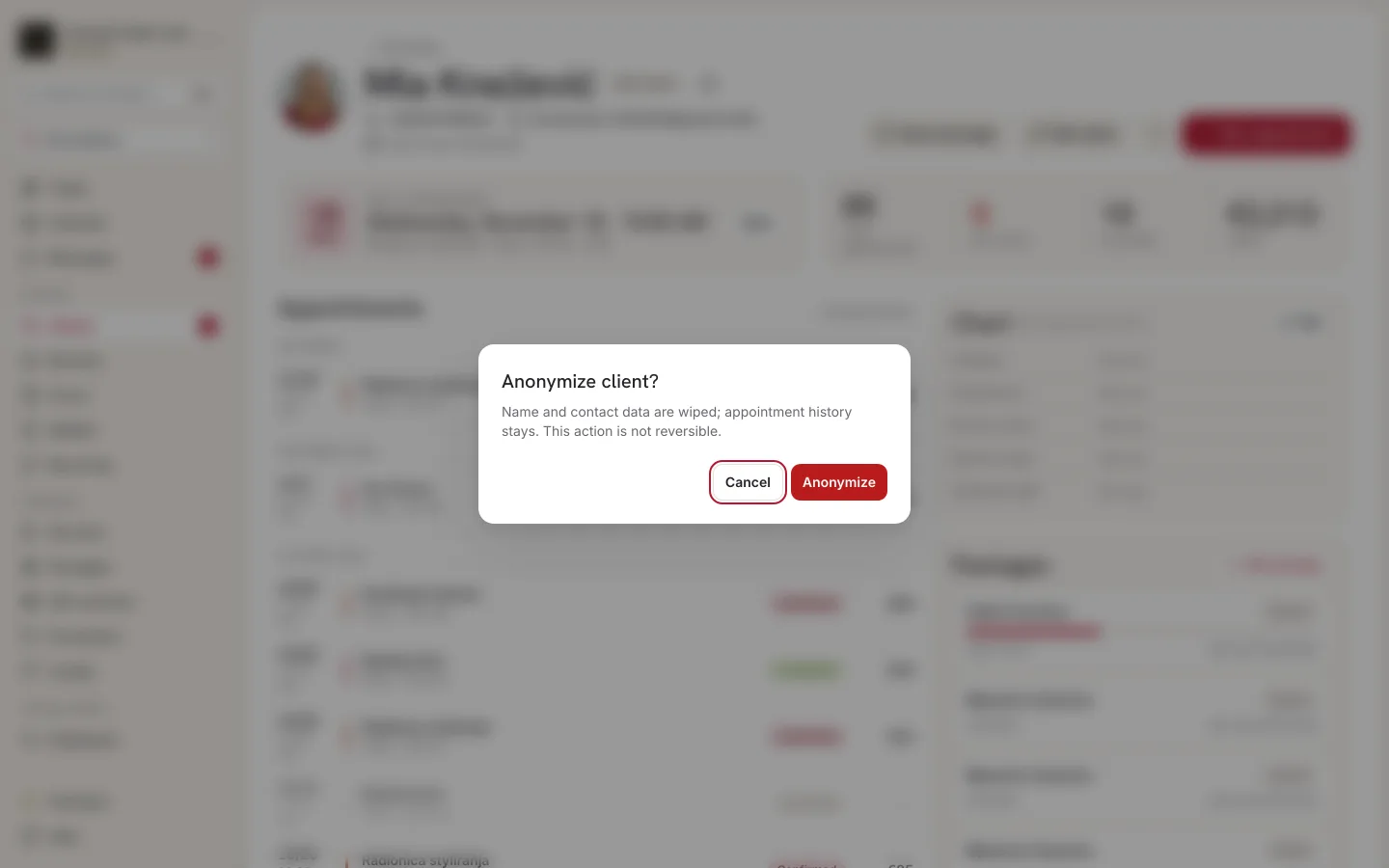
- In the “Anonymize client?” dialog, read the warning: “Name and contact data are wiped; appointment history stays. This action is not reversible.”
- Click Anonymize. You're taken back to the client list, and the client is no longer in it.
What is deleted and what is kept
| Data | After anonymization |
|---|---|
| Name | Replaced with Anonymous client. |
| Email, phone, profile picture, notes and date of birth | Deleted. |
| Chart (allergies, preferences, additional notes, preferred staff) | Deleted. |
| Intake form answers and accepted consents | Permanently deleted. |
| Appointments | Stay in the calendar and statistics, but without the client's name. This keeps your revenue and visit figures accurate. |
| Reviews the client left | Stay, but without the client's name. |
| Conversations in Messages | Not deleted. |
| Issued invoices | Not changed, because they're part of your fiscal records. |
Anonymized clients in the client list
Anonymized records are hidden by default. When you turn on the Show anonymized switch in the client list, they appear as Anonymous client with the Anonymized badge, with no contact details and no message button. Their row can't be opened.
If the same person gets in touch with you again later, they get a new, empty profile. In a members-only business, they have to ask for access again, which you approve like any other request (see Client requests).
When a client deletes their own account
A client who uses the Appointa app can delete their Appointa account themselves. You don't have to do anything.
- In the Appointa app, the client opens Profile and chooses Delete account.
- They read the warning (“Deleting your account is permanent. Your personal data will be removed and your appointment history anonymised. This cannot be undone.”) and tap Send deletion request.
- They get a confirmation link by email. The link is valid for about an hour and can be used only once. A new request cancels the previous link.
- The link opens the Delete your Appointa account page, where the client confirms with the Delete account button.
What this means for your business:
- The client's profile in your business is anonymized and shown as Anonymous client. The name, email, phone, profile picture, notes, date of birth and client card (allergies, preferences, styling notes and preferred staff member) are deleted.
- Their intake form answers are permanently deleted.
- Appointments, issued invoices and conversations stay with you.
- The client is signed out on all devices and no longer receives push notifications.
When a client leaves your business
A client who doesn't want to delete their whole account can simply leave your business in the Appointa app (the Leave action). The app explains to them: “The place disappears from your home, but your history stays. Booking again re-links you.”
Nothing is deleted on your side. The profile and the entire history stay, and the client's status in the client list changes from app to web, because the profile is no longer linked to their account. When they get in touch again, Appointa recognizes them by mobile number (and, for access requests, also by email) and restores the link to the existing profile, unless you've archived it in the meantime (see Archived clients).
Consents
- Consents in intake forms. When a client confirms a consent in a form, Appointa saves its full text, exactly as the client saw it, along with the moment of confirmation. You can see accepted consents on the appointment, in the Accepted consents section (see Intake forms and consents).
- GDPR confirmation when importing. When importing from Excel, you confirm that you have a legal basis to process the imported data and that the clients are aware of it.
- Marketing. Appointa has no separate marketing consent on the client profile. Neither manual entry nor an import means the client has agreed to promotional messages.
Promotional notifications and opting out
Promotions from Appointa reach clients only as push notifications in the Appointa app. Clients without the app (added manually, imported or those who booked without signing in) don't receive them.
Clients turn them off themselves in the Appointa app: Profile → Notification settings → Promotions (“Deals and special offers”). In the same place, they separately turn the Reminders, Messages, Loyalty and Waitlist notifications on or off. Once they turn off Promotions, they no longer receive promotional notifications.
When a client doesn't want SMS messages, click Edit client on their profile and turn on Don't send SMS to this client. They then receive notifications by email, or as a push notification if they have the app (see SMS notifications).
How long data is kept
| Data | How long |
|---|---|
| Intake form answers and consents | Automatically deleted 24 months after the appointment. |
| Rejected client requests | Deleted as soon as you click Reject. |
| Other client data | Until you anonymize the client or the client deletes their Appointa account. |
FAQ
A client is asking me to delete their data. What do I need to do?
Open their profile, click ⋯ and choose Anonymize client (see Anonymizing a client). If the client has future appointments they don't want, cancel those first.
Can I undo an anonymization?
No. Deleted data can't be recovered. If the client gets in touch again, add them as a new client.
Why doesn't anonymization delete the appointments too?
Appointments are part of your business's records and statistics (revenue, visits, staff performance). After anonymization, they're no longer linked to any person.
A staff member can't anonymize a client. Why?
Only the owner and managers can anonymize a client, so a staff member doesn't see the ⋯ menu with Anonymize client on the profile. They need to ask the owner or a manager.
A client doesn't have the app and wants us to delete their data. How?
A client without an Appointa account can't delete anything themselves. Anonymize them yourself at their request.