Reminders and no-shows
Appointment reminders that send themselves — by SMS, email or push
Appointa reminds clients about a day ahead: a free push if they have the app, otherwise an SMS (with the add-on) or email. Email and SMS reminders carry a cancellation link, so a client who can’t come cancels instead of leaving the slot empty. You send nothing by hand.
Included in every plan, free Starter too
How it works
- 01
Appointment linked to client
Whether the client books online or you add the appointment after a call, it’s linked to their client card. Add both an email and a mobile number, so the reminder always has somewhere to go.
- 02
Appointa picks the channel
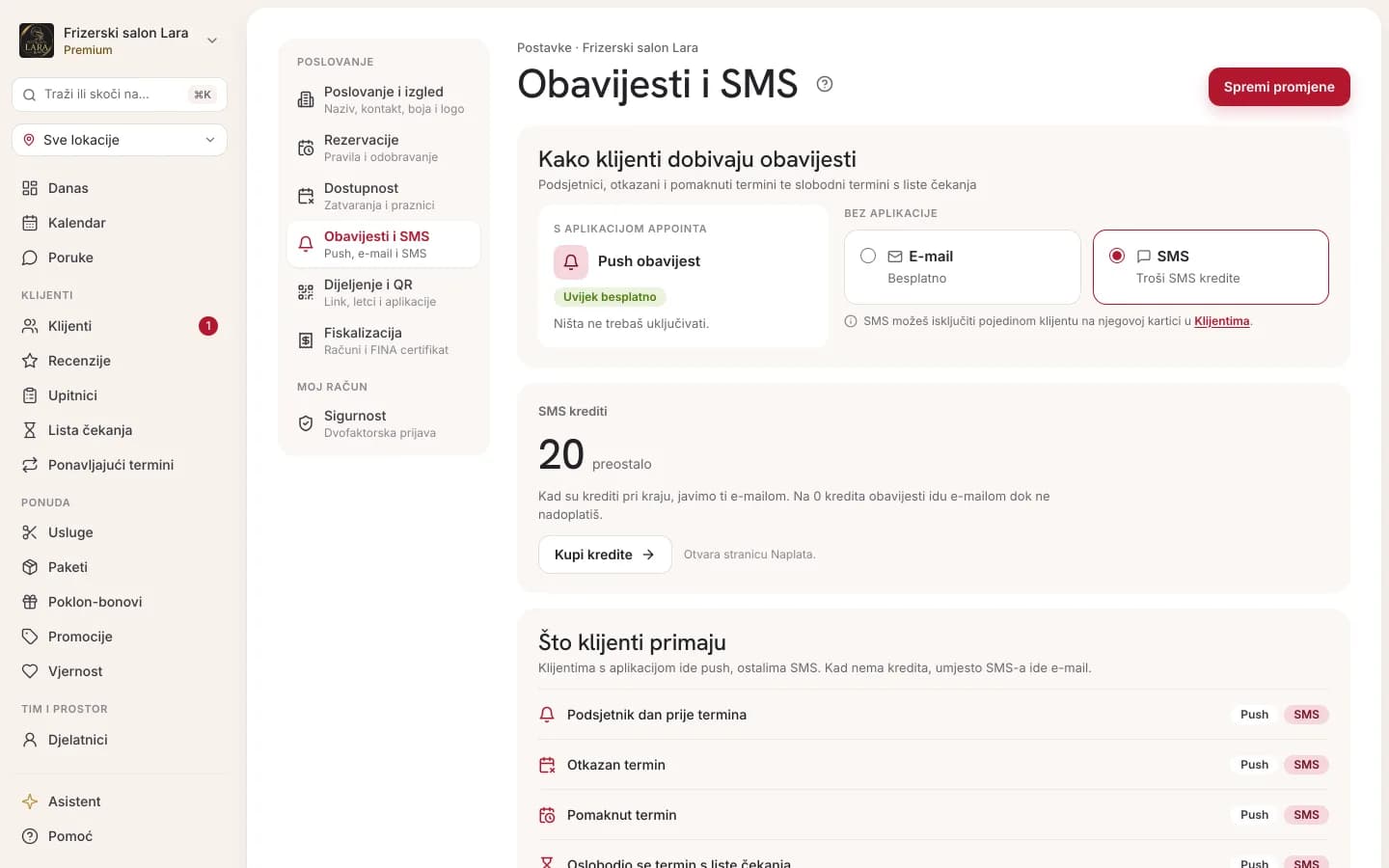
Clients with the Appointa app get a free push. Those without it get an SMS if the SMS add-on is on and you have credits, otherwise an email. As a rule, one reminder per client.
- 03
Reminder arrives a day ahead
About 24 hours ahead, the client gets a reminder with your business name and the time. If they can’t make it, they cancel via the email or SMS link, and you’re notified in Appointa Pro.
What you get
Automatic, on every plan
Reminders go out on their own, on every plan: there’s nothing to switch on and nothing to send by hand. They arrive about 24 hours before the appointment, once per appointment, with the time in your business’s time zone. Appointments booked less than about 23 hours ahead don’t get one.
Push, SMS or email
Appointa uses the first channel available for each client. A push in the Appointa app is free. An SMS goes to clients without the app if the add-on is on, you have credits and their mobile number is valid. Otherwise it goes by free email, if they have one.
SMS add-on with prepaid credits
Turn SMS on with one switch in the booking settings, on any plan. You pay with prepaid credits, not a subscription, and get 20 free trial credits the first time. When credits run out, notifications switch to email on their own; SMS resumes once you top up.
Cancellation link in the reminder
Email and SMS reminders carry a link the client can use to cancel, up to the deadline you set (2 hours before the start by default). The time frees up straight away, your team is notified, and on Premium the waitlist offers the freed slot to the next client waiting.
No-show tracking and blocking
Mark a no-show in the appointment detail with a reason; you see the count on the client card and as the no-show rate in Reports. Set a block, and a client with that many no-shows in the last 6 months can’t book online, but you can still book them in.


Frequently asked questions
Can I choose when the reminder is sent?
No. The reminder goes out about 24 hours before the appointment, so the client gets it the day before at roughly the same time of day. The text can’t be edited either: it’s the same for every business and includes your business name and the appointment time, plus a cancellation link in the email and SMS.
Do clients without the app get a reminder?
Yes: by SMS if the SMS add-on is on, otherwise by email, so add both a mobile number and an email to the client card. The same goes for appointments you add after a phone call, as long as they’re linked to a client. Walk-ins, which aren’t linked to a person, and clients with no app, email or SMS get nothing.
How much does an SMS reminder cost?
One credit is one SMS segment. A pack of 100 credits currently costs €15, and bigger packs cost less per credit. A reminder for a business with a short name without Croatian letters uses one credit, a long name two, and a name with a letter like š or č three. Clients with the app get a free push.
What happens if I run out of SMS credits?
Notifications to clients without the app switch to email on their own, and as soon as you buy credits, SMS resumes without switching anything back on. When the balance runs low, the owner gets an email warning with a top-up link. A message that couldn’t be sent isn’t charged, because the credit is returned. Credits are a one-off card purchase on the Billing page.
How else can I reduce no-shows?
Alongside reminders, set an earlier cancellation deadline, a lower limit on active bookings per client and a block after a few no-shows in the booking settings. If no-shows are frequent, try at most 1–2 active bookings, cancellation no later than 24 hours ahead and a block after 2–3 no-shows. For long services, you can also confirm every booking yourself.
Can I send promotions or replies by SMS?
No. SMS is used for only five notifications: the reminder, a cancellation, a time change and two waitlist notifications. Booking confirmations, chat messages and promotional messages don’t go by SMS. You message clients who have the app in Messages, and for a client who doesn’t want SMS, you turn it off on their client card.
Try it free, no card needed.
Starter is free with no time limit, and a demo business with ready services and appointments opens in a few clicks.
Start free