How prices are calculated
What makes up an appointment's final price, how promotions, loyalty rewards, packages and gift vouchers apply, and what is saved on the appointment.
Appointa calculates the price of every appointment on its own: it starts from the service price in your price list, subtracts at most one discount and permanently records the result on the appointment. On this page you'll find out how the final amount is reached, why a promotion and a loyalty reward don't add up, how packages and gift vouchers behave, and where you and the client see the price.
In short
Final price = base price − discount, and never less than €0.
- The base price is the service price from the price list or, for appointments you enter yourself, the amount you enter.
- The discount is either a promotion discount or a loyalty program reward — never both.
- A package covers the whole appointment: the final price is €0, and one visit is deducted from the package.
- A gift voucher isn't a discount: it doesn't change the price but records how much of it was paid with the voucher.
Base price
| How the appointment was created | Base price |
|---|---|
| The client books online (web or app) | The service price from the price list at the time of booking. |
| You enter the appointment in the calendar | The amount in the Price (EUR) field of the New appointment form. The field is filled in with the service price, and you can change it before saving. |
| Recurring appointment | The service price at the moment Appointa adds the series appointment to the calendar. |
The service price is the same for all employees — Appointa has no separate price per employee (see Services and price list).
Promotion discount
A promotion gets onto an appointment in one of two ways:
- The client enters a code. On the web, at the Your details step, they enter the code in the Have a code? field and click Apply; in the client app they use the promo code field. If the code isn't valid for the selected service, employee, day or time, the client sees a message with the reason (e.g. “This promo code isn't valid for the selected weekday.”).
- Automatically. If the client doesn't enter a code, Appointa itself applies a promotion the client qualifies for — a personal promotion intended for the signed-in client or, if there is none, the public promotion with the biggest discount. Promotions that are valid only with a code are never applied automatically.
Read how to create a promotion and set its conditions on the Promotions and promo codes page.
Loyalty reward
If you have a loyalty program, the points a client has collected can reduce the price of an appointment:
- In the client app, the Use loyalty credit switch appears when the client has a reward they can redeem, and it's on by default (unless the client has already entered a code). The client can turn it off. While it's on, the summary shows a Loyalty credit row, and the automatic promotion isn't applied.
- On the web there's no switch: if Auto-redeem rewards is turned on in the program, the reward is applied to the signed-in client automatically — but only if no promotion has been applied to the appointment.
Read about the types of program (a stamp card or points in euros) on the Loyalty program page.
Only one discount per appointment
Only one way of reducing the price applies to a single appointment. That way the price can't drop twice, and the client knows clearly what they used.
| Combination | Is it allowed? |
|---|---|
| Promotion + loyalty reward | No. If a promotion is applied, the reward isn't used automatically; if the client turns on Use loyalty credit in the app, the automatic promotion is dropped; a promo code and points together are rejected. |
| Package + promotion, loyalty reward or gift voucher | No. A package covers the whole appointment and can't be combined with anything. |
| Promotion or gift voucher on the web | The Have a code? field accepts one code — either a promo code or a gift voucher code. |
For services with Show price to clients turned off, discounts don't apply at all, while packages work normally (see Price and occupancy display).
The price never goes below zero
A discount can never be greater than the base price. If a promotion or reward would exceed the service price (e.g. a €30 discount on a €25 service), the applied discount is capped at €25 and the final price is €0. The excess discount isn't carried over to the next appointment.
Appointment paid with a package
When a visit package or membership covers the appointment — the client booked signed in, or you entered the appointment for them:
- the base price of the service is saved on the appointment, but the final price is €0;
- one visit is deducted from the package right away, and if the appointment is cancelled, the visit is returned;
- promotions, loyalty rewards and gift vouchers don't apply, even when the client entered a code.
A package is paid for when it's sold, so no invoice is issued for the individual appointment either. Read everything about packages on the Packages and memberships page.
Appointment paid with a gift voucher
A gift voucher doesn't change the price of the appointment. Appointa records with the appointment how much of the final price was paid with the voucher:
| Type of voucher | What it covers |
|---|---|
| Amount voucher | The final price, up to the remaining balance on the voucher. The rest of the voucher stays for next time. |
| Service voucher | The whole final price; the voucher is then used up. |
The client enters the voucher code in the Have a code? field (on the web, Gift voucher accepted is then shown). When you enter an appointment in the calendar, you enter the code in the Gift voucher code (optional) field of the New appointment form (the field exists on the Premium subscription plan, which also includes gift vouchers). The appointment details then show e.g. “Paid by gift voucher · €25.00”. Read more on the Gift vouchers page.
What is saved on the appointment
At the moment of booking, Appointa permanently records the calculated price on the appointment:
| Data | Example |
|---|---|
| Base price | €25.00 |
| Promotion discount | €5.00 |
| Loyalty program credit | €0.00 |
| Final price | €20.00 |
| Promotion used | “Quiet Tuesdays” |
| Package used to pay for the appointment | — |
In addition, the amount paid with a gift voucher, if any, is recorded separately.
That's why later changes don't change history:
- a new service price applies only to new bookings;
- editing or switching off a promotion doesn't change appointments that are already booked;
- reports and invoices always use the price that was agreed with the client.
When an appointment is cancelled — in the calendar, by the client in the app or through the cancellation link, and also when a booking request expires — the price stays recorded on the appointment, but what the booking spent comes back: the visit to the package, the stamps to the loyalty card and the amount to the gift voucher, and the promo-code use no longer counts toward the limits. An appointment that was already completed or marked as a no-show returns nothing.
What the client sees
On the web, at the Your details step, after applying a promo code the client sees the name of the promotion with the discount amount and a breakdown:
- Price — the base price (struck through),
- Discount — the promotion amount,
- Total — the final price.
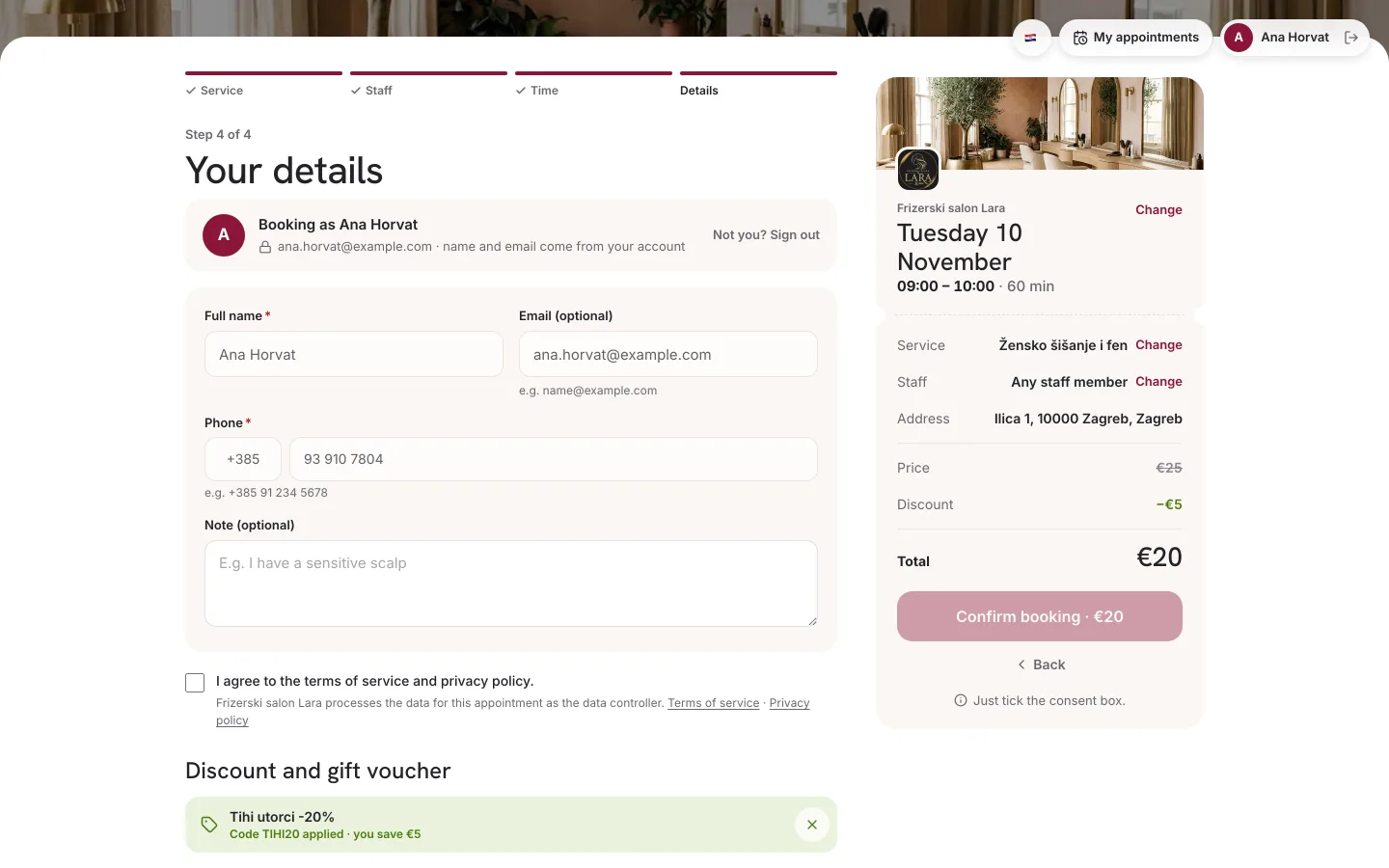
On the confirmation screen, the Price row shows the final amount — including the discount from an automatic promotion — and, if a promo code was applied, the saving too (e.g. “Promo: you save €5.00”).
In the client app, the summary before confirmation shows Price, a row with the promotion name or Loyalty credit, and Total. When a package covers the appointment, the amount rows disappear and a row with the package name and visit balance remains.
For services with a hidden price, the client doesn't see any amount.
What you see
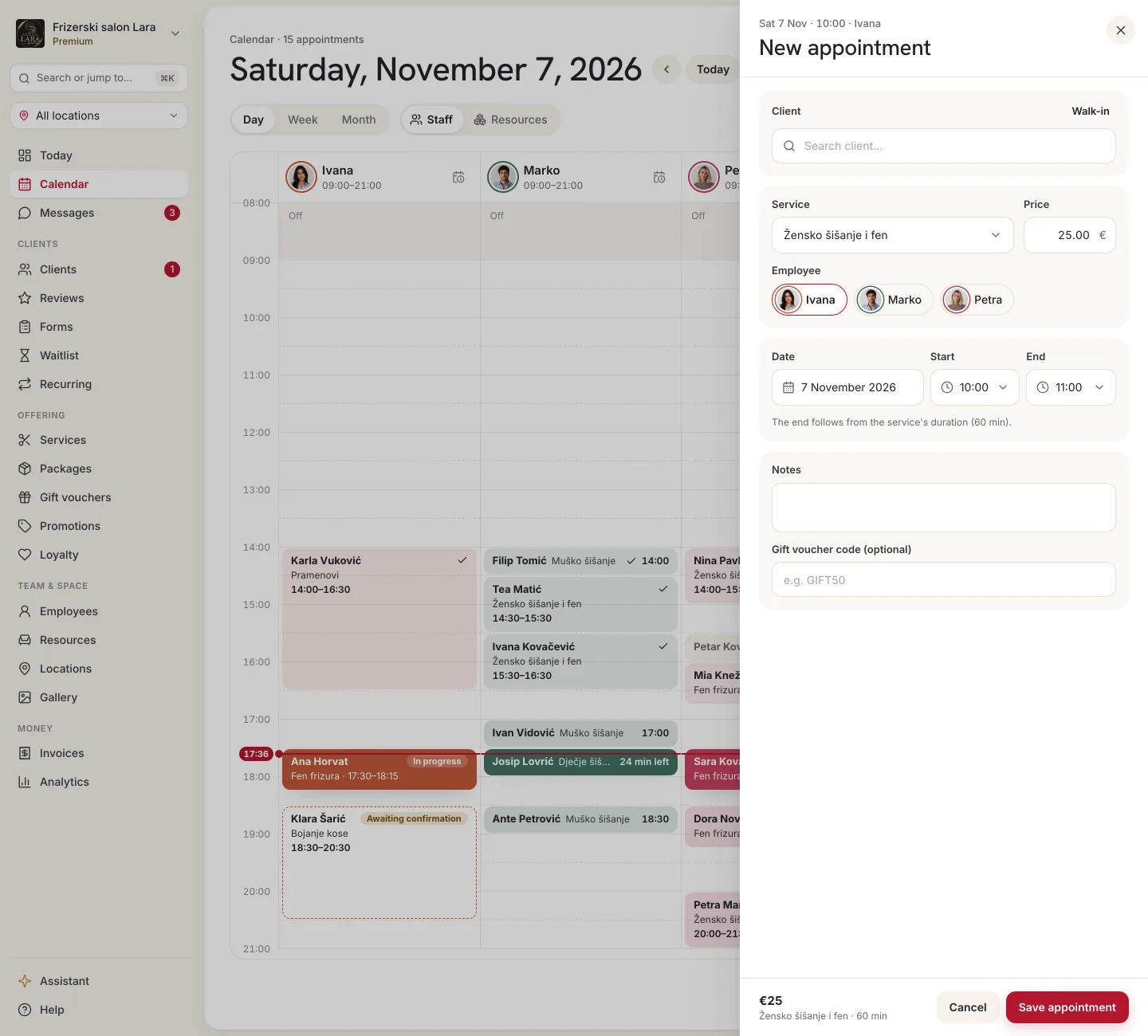
- New appointment in the calendar — the Price (EUR) field is filled in with the service price; you can change the amount before saving.
- Client profile — in Appointment history, each appointment shows its final price (a dash for cancelled appointments and no-shows), and Spent adds up the final prices of completed appointments (see client profile).
- Analytics — revenue is calculated from the final prices of appointments (see Analytics).
- Invoices — the invoice for an appointment is issued for the final price. Appointa doesn't issue an invoice for an appointment paid with a package or a gift voucher (see Issuing invoices).
FAQ
Can a client use a promotion and loyalty points on the same appointment?
No. A single appointment gets either a promotion or a loyalty reward. When a promotion is applied to the appointment, the points aren't spent and stay with the client for another appointment.
Can I give a client a discount manually?
Yes, when you enter the appointment yourself: in the New appointment form, enter the reduced amount in the Price (EUR) field.
Why does an appointment have a price of €0?
The appointment was paid with a package, a discount covered the whole price, or the service is set to €0 in the price list.
Does a gift voucher reduce revenue in the reports?
No. A voucher doesn't change the final price of the appointment; it only records that the amount was paid with the voucher.
I changed a service price. What happens to appointments that are already booked?
They stay at the old price. The new price applies to new bookings.