Mobile apps
A booking app for your clients — and one for your team
In the Appointa app, your clients book and cancel appointments themselves, get reminders and message you. You and your team run the day from your phones in Appointa Pro: the calendar, new appointments, clients and messages. Both work on iPhone and Android, with the same data as the web.
Included in every plan, free Starter too
How it works
- 01
Your client downloads Appointa
Clients sign in with Apple, Google or an email link, no password needed. They connect by scanning your QR code or searching for your business, then book at once or after your approval.
- 02
You activate Appointa Pro
On the web you generate a one-time QR code and scan it with your phone, no password needed. Each team member activates the app with their own code and works in their own role.
- 03
Same data everywhere
An appointment booked in the client app shows up straight away in the web calendar and Appointa Pro, and vice versa. You get a new-booking notification; the client gets a reminder the day before.
What you get
Booking in a few taps
The client picks a service, a team member or “Anyone available”, then a date and a free slot. The confirmation shows the service, team member, address and price, with room for a note. If you confirm bookings manually, the request waits for you and the client gets your answer.
Reminders, messages and cancelling
A client with the app gets a push reminder about a day ahead, a notice when the appointment is cancelled or moved, and your replies to their messages. Push is free and uses no SMS credits. Clients can cancel themselves, up to the deadline you set in your booking rules.
The working day in Appointa Pro
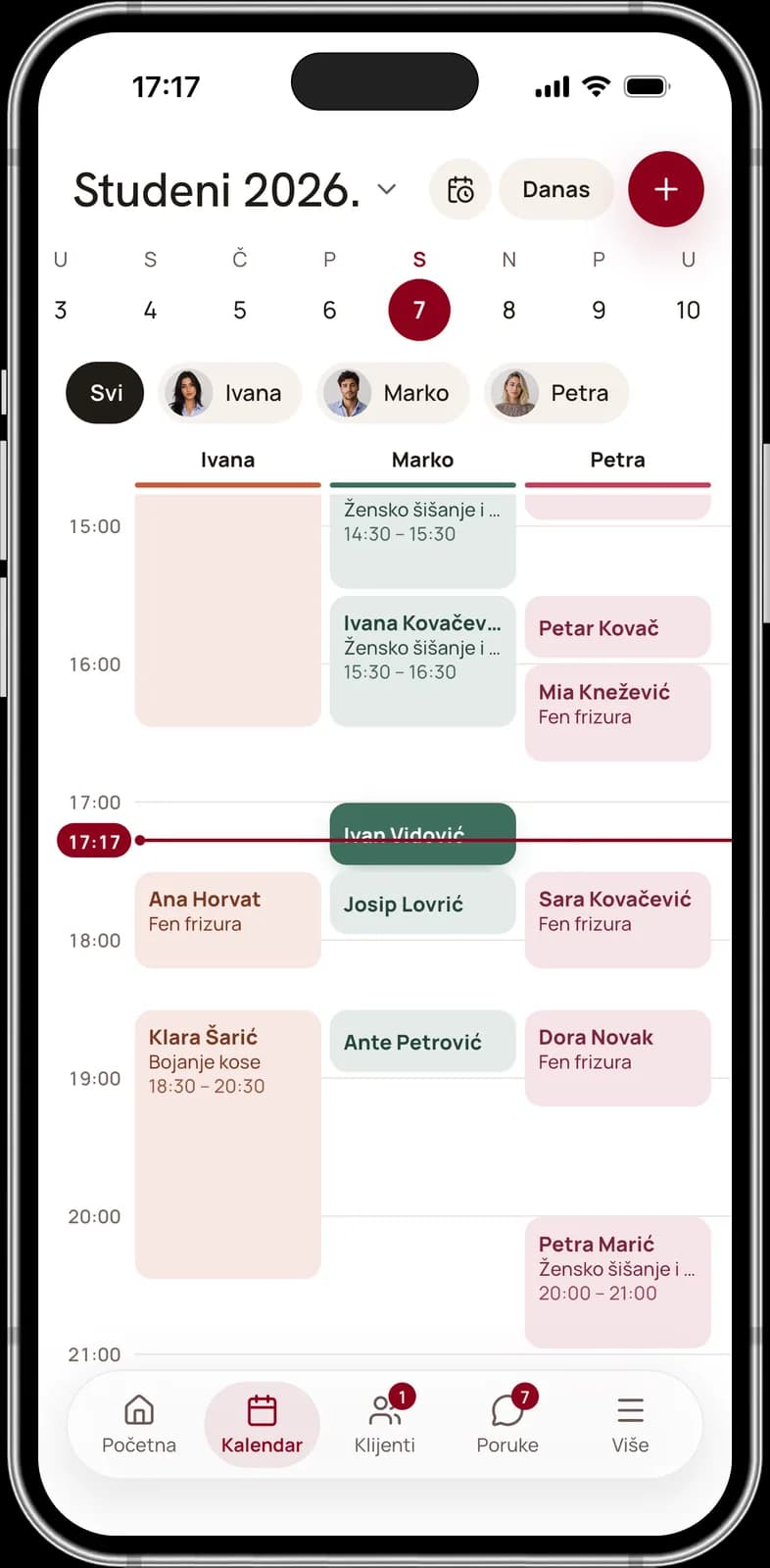
Home shows the day's revenue and remaining and completed appointments, while the day calendar shows appointments by the hour, filtered by team member if you like. Swipe a row to confirm, complete or cancel, and tap + to add a new appointment or a walk-in.
Clients and messages on the go
Search clients by name or phone, approve access requests and open the client record with allergies and notes the client never sees. Reply to messages from your phone, and get a notification for every new booking, cancellation and client message.
Management and invoices on mobile
Owners and managers edit services, team members, shifts and time off in the app and follow the analytics. Businesses in Croatia on Pro and Premium also issue fiscalised invoices there, once the owner sets up fiscalisation on the web. The waitlist, promotions and loyalty come with Premium.


Frequently asked questions
Do clients have to install the app?
No. Clients can also book on your public page, in an ordinary browser. They then get reminders by email, or by SMS if you turn on the SMS add-on, which is paid for with prepaid credits. The Appointa app is for those who want more: push reminders, messages in one place and their appointments always at hand.
Are the apps included in my plan?
Yes. Both apps, Appointa for clients and Appointa Pro for the team, are part of every plan, Starter included. Some tools depend on the plan: recurring appointments need Pro or Premium, while the waitlist, promotions, loyalty, gift vouchers and visit packages need Premium.
Can a team member use Appointa Pro on their own phone?
Yes. Once they accept the invitation, the team member signs in on the web, generates a QR code on their own dashboard and scans it with their phone. The app then works with their account and role: they see the working tabs, but not business management, which is for the owner and managers.
How do I sign in to Appointa Pro?
Without a password: on the web you generate a one-time QR code that's valid for five minutes and scan it with your phone. While you use the app, your sign-in renews itself; if you don't open it for 30 days, you'll need a new QR code. Everyone generates their own code, because the app works with the permissions of whoever generated it.
Can I move an appointment in the app?
No. Appointa Pro lets you change the status and cancel, while you move appointments on the web, in the appointment detail or by dragging in the calendar. The client is notified about the moved appointment through the channel they have: in the app, by SMS with the add-on turned on, or by email.
Which phones are the apps available for?
Both apps are available for iPhone and Android, on the App Store and Google Play. Clients look for the Appointa app, while you and your team use Appointa Pro: they are two different apps with different icons. If you also book appointments somewhere yourself, you can have both on the same phone.
Try it free, no card needed.
Starter is free with no time limit, and a demo business with ready services and appointments opens in a few clicks.
Start free